> ## Documentation Index
> Fetch the complete documentation index at: https://docs-dev-automated-sdk-version-update.mintlify.site/llms.txt
> Use this file to discover all available pages before exploring further.

> Learn how to configure your HTTP Vault Connections to authorize HTTP requests to external APIs or services.

# HTTP Vault Connection

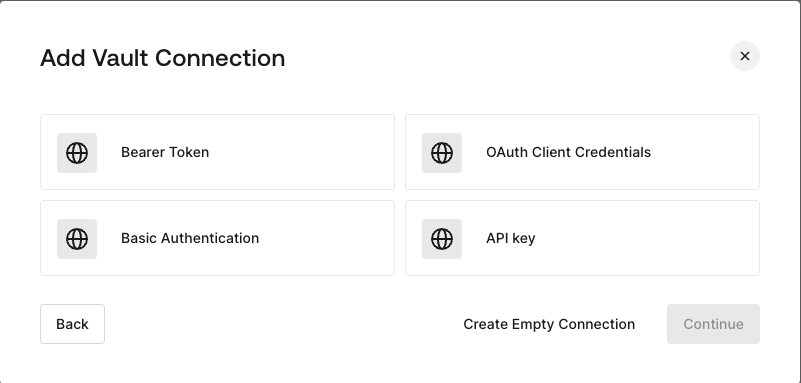
## Configure your HTTP Vault Connection Options

HTTP Vault Connection can be configure with different authentication options and then be used at your HTTP Request Flow Actions.
<Frame>
  <img src="https://mintcdn.com/docs-dev-automated-sdk-version-update/j5tlqzpJuvD-o885/docs/images/customize/forms/vaults/http-vault-connection-options.png?fit=max&auto=format&n=j5tlqzpJuvD-o885&q=85&s=dc3b29c0add4b725dbde4cf73170c6cf" alt="Dashboard > Actions > Forms > Vault > HTTP" data-og-width="801" width="801" data-og-height="383" height="383" data-path="docs/images/customize/forms/vaults/http-vault-connection-options.png" data-optimize="true" data-opv="3" srcset="https://mintcdn.com/docs-dev-automated-sdk-version-update/j5tlqzpJuvD-o885/docs/images/customize/forms/vaults/http-vault-connection-options.png?w=280&fit=max&auto=format&n=j5tlqzpJuvD-o885&q=85&s=8c668344c145e1e6818153eafd6bfa89 280w, https://mintcdn.com/docs-dev-automated-sdk-version-update/j5tlqzpJuvD-o885/docs/images/customize/forms/vaults/http-vault-connection-options.png?w=560&fit=max&auto=format&n=j5tlqzpJuvD-o885&q=85&s=399cca7c50e729ccd66fa50e3a08350d 560w, https://mintcdn.com/docs-dev-automated-sdk-version-update/j5tlqzpJuvD-o885/docs/images/customize/forms/vaults/http-vault-connection-options.png?w=840&fit=max&auto=format&n=j5tlqzpJuvD-o885&q=85&s=d58fc878c4c2790a999838f07c003cca 840w, https://mintcdn.com/docs-dev-automated-sdk-version-update/j5tlqzpJuvD-o885/docs/images/customize/forms/vaults/http-vault-connection-options.png?w=1100&fit=max&auto=format&n=j5tlqzpJuvD-o885&q=85&s=5ff8909da87bbb3566e3c2bf8726740e 1100w, https://mintcdn.com/docs-dev-automated-sdk-version-update/j5tlqzpJuvD-o885/docs/images/customize/forms/vaults/http-vault-connection-options.png?w=1650&fit=max&auto=format&n=j5tlqzpJuvD-o885&q=85&s=e33d4d7fc951244387af6b362a44d5f5 1650w, https://mintcdn.com/docs-dev-automated-sdk-version-update/j5tlqzpJuvD-o885/docs/images/customize/forms/vaults/http-vault-connection-options.png?w=2500&fit=max&auto=format&n=j5tlqzpJuvD-o885&q=85&s=a2d2bea7e4177f97882ee4f2006d4f8d 2500w" />
</Frame>

## Configure your HTTP Vault Connection for Bearer Token

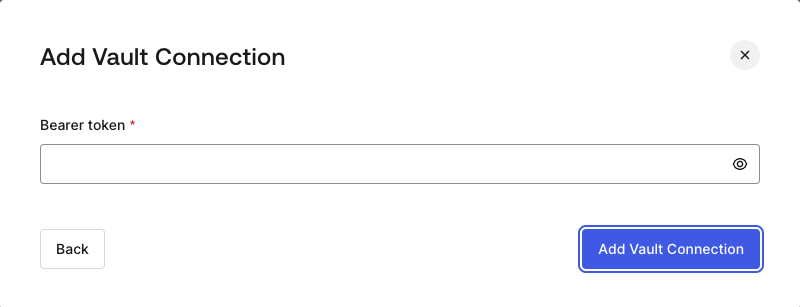
To configure a HTTP Vault Connection using **Bearer Token** authorization, you need to set the required parameters.
<Frame>
  <img src="https://mintcdn.com/docs-dev-automated-sdk-version-update/j5tlqzpJuvD-o885/docs/images/customize/forms/vaults/http-vault-connection-bearer-token.png?fit=max&auto=format&n=j5tlqzpJuvD-o885&q=85&s=e80621b25818ec534f0398c461d5e467" alt="Dashboard > Actions > Forms > Vault > HTTP" data-og-width="800" width="800" data-og-height="307" height="307" data-path="docs/images/customize/forms/vaults/http-vault-connection-bearer-token.png" data-optimize="true" data-opv="3" srcset="https://mintcdn.com/docs-dev-automated-sdk-version-update/j5tlqzpJuvD-o885/docs/images/customize/forms/vaults/http-vault-connection-bearer-token.png?w=280&fit=max&auto=format&n=j5tlqzpJuvD-o885&q=85&s=34bb27734b7962d3e79150cb75686619 280w, https://mintcdn.com/docs-dev-automated-sdk-version-update/j5tlqzpJuvD-o885/docs/images/customize/forms/vaults/http-vault-connection-bearer-token.png?w=560&fit=max&auto=format&n=j5tlqzpJuvD-o885&q=85&s=c1616a749858d776a77cca4839f27f8d 560w, https://mintcdn.com/docs-dev-automated-sdk-version-update/j5tlqzpJuvD-o885/docs/images/customize/forms/vaults/http-vault-connection-bearer-token.png?w=840&fit=max&auto=format&n=j5tlqzpJuvD-o885&q=85&s=5e56c9b94852379cba1bc5f1e14de4cb 840w, https://mintcdn.com/docs-dev-automated-sdk-version-update/j5tlqzpJuvD-o885/docs/images/customize/forms/vaults/http-vault-connection-bearer-token.png?w=1100&fit=max&auto=format&n=j5tlqzpJuvD-o885&q=85&s=c78a1c0c6c39128332ce7c3ff571e392 1100w, https://mintcdn.com/docs-dev-automated-sdk-version-update/j5tlqzpJuvD-o885/docs/images/customize/forms/vaults/http-vault-connection-bearer-token.png?w=1650&fit=max&auto=format&n=j5tlqzpJuvD-o885&q=85&s=86de1e8414c6e7eb2897df0394772e2a 1650w, https://mintcdn.com/docs-dev-automated-sdk-version-update/j5tlqzpJuvD-o885/docs/images/customize/forms/vaults/http-vault-connection-bearer-token.png?w=2500&fit=max&auto=format&n=j5tlqzpJuvD-o885&q=85&s=c5d1dca46687321decee1709f5eae5bb 2500w" />
</Frame>

### Input settings

| Parameter    | Description                                           |
| ------------ | ----------------------------------------------------- |
| Bearer Token | Static token used for external service authorization. |

## Configure your HTTP Vault Connection for OAuth Client Credentials

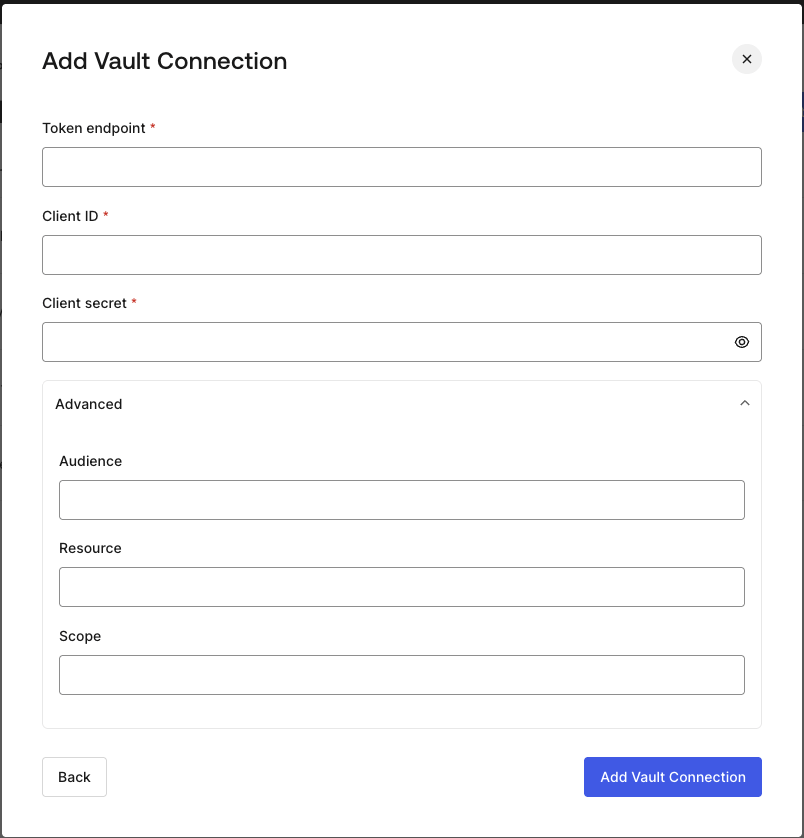
To configure a HTTP Vault Connection using **Client Credentials** authorization, you need to set the required parameters.
<Frame>
  <img src="https://mintcdn.com/docs-dev-automated-sdk-version-update/j5tlqzpJuvD-o885/docs/images/customize/forms/vaults/http-vault-connection-oauth-client-credentials.png?fit=max&auto=format&n=j5tlqzpJuvD-o885&q=85&s=f91bc0341b9a70737005f409ece3dcb6" alt="Dashboard > Actions > Forms > Vault > HTTP " data-og-width="804" width="804" data-og-height="838" height="838" data-path="docs/images/customize/forms/vaults/http-vault-connection-oauth-client-credentials.png" data-optimize="true" data-opv="3" srcset="https://mintcdn.com/docs-dev-automated-sdk-version-update/j5tlqzpJuvD-o885/docs/images/customize/forms/vaults/http-vault-connection-oauth-client-credentials.png?w=280&fit=max&auto=format&n=j5tlqzpJuvD-o885&q=85&s=6580339b64aa47b414ea63c320799886 280w, https://mintcdn.com/docs-dev-automated-sdk-version-update/j5tlqzpJuvD-o885/docs/images/customize/forms/vaults/http-vault-connection-oauth-client-credentials.png?w=560&fit=max&auto=format&n=j5tlqzpJuvD-o885&q=85&s=f268a6c766a11e1abcbfa0c9c358e147 560w, https://mintcdn.com/docs-dev-automated-sdk-version-update/j5tlqzpJuvD-o885/docs/images/customize/forms/vaults/http-vault-connection-oauth-client-credentials.png?w=840&fit=max&auto=format&n=j5tlqzpJuvD-o885&q=85&s=a8cf03aef88e213b092ba90270d67975 840w, https://mintcdn.com/docs-dev-automated-sdk-version-update/j5tlqzpJuvD-o885/docs/images/customize/forms/vaults/http-vault-connection-oauth-client-credentials.png?w=1100&fit=max&auto=format&n=j5tlqzpJuvD-o885&q=85&s=693f4ad523bca02d314c0c88462b1bb4 1100w, https://mintcdn.com/docs-dev-automated-sdk-version-update/j5tlqzpJuvD-o885/docs/images/customize/forms/vaults/http-vault-connection-oauth-client-credentials.png?w=1650&fit=max&auto=format&n=j5tlqzpJuvD-o885&q=85&s=d32c26cb5aeb875efc181700e749bccb 1650w, https://mintcdn.com/docs-dev-automated-sdk-version-update/j5tlqzpJuvD-o885/docs/images/customize/forms/vaults/http-vault-connection-oauth-client-credentials.png?w=2500&fit=max&auto=format&n=j5tlqzpJuvD-o885&q=85&s=8a74691ca827a7895b5a90fb19b50de2 2500w" />
</Frame>

### Input settings

| Parameter           | Description                                                               |
| ------------------- | ------------------------------------------------------------------------- |
| Tenant Endpoint     | Tenant Endpoint of the Authorization Server issuing the Access Tokens.    |
| Client ID           | Client ID of your M2M Application authorized for Custom API.              |
| Client Secret       | Client Secret of your M2M Application authorized for Custom API.          |
| Audience (Optional) | Custom API Audience. Normally used for Custom APIs defined in Auth0.      |
| Resource (Optional) | Custom API Resource. Standard parameter with similar meaning of Audience. |
| Scope (Optional)    | Scope list in string format separated by spaces.                          |

## Configure your HTTP Vault Connection for API Key

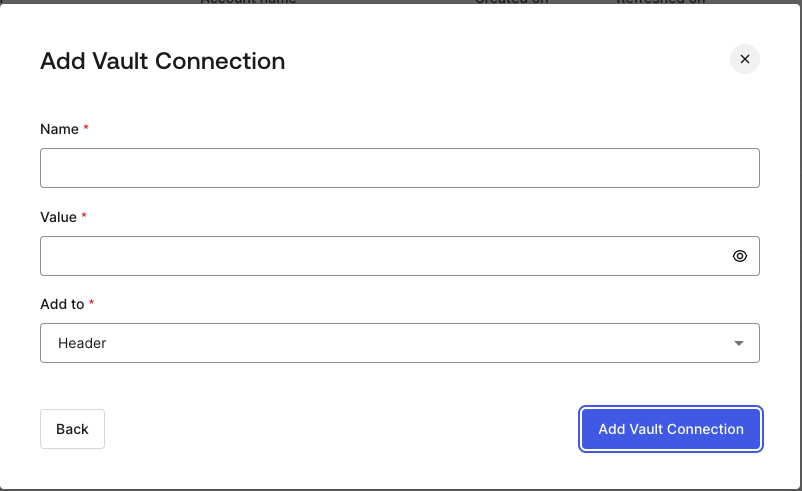
To configure a HTTP Vault Connection using **API Key** authorization, you need to set the required parameters.
<Frame>
  <img src="https://mintcdn.com/docs-dev-automated-sdk-version-update/j5tlqzpJuvD-o885/docs/images/customize/forms/vaults/http-vault-connection-api-key.png?fit=max&auto=format&n=j5tlqzpJuvD-o885&q=85&s=d92206290df992aa4085e8a5035914ca" alt="Dashboard > Actions > Forms > Vault > HTTP " data-og-width="802" width="802" data-og-height="491" height="491" data-path="docs/images/customize/forms/vaults/http-vault-connection-api-key.png" data-optimize="true" data-opv="3" srcset="https://mintcdn.com/docs-dev-automated-sdk-version-update/j5tlqzpJuvD-o885/docs/images/customize/forms/vaults/http-vault-connection-api-key.png?w=280&fit=max&auto=format&n=j5tlqzpJuvD-o885&q=85&s=2d44317f6103bac8f23364da88cc62bc 280w, https://mintcdn.com/docs-dev-automated-sdk-version-update/j5tlqzpJuvD-o885/docs/images/customize/forms/vaults/http-vault-connection-api-key.png?w=560&fit=max&auto=format&n=j5tlqzpJuvD-o885&q=85&s=464545fc93728fd050e2c111d639de8d 560w, https://mintcdn.com/docs-dev-automated-sdk-version-update/j5tlqzpJuvD-o885/docs/images/customize/forms/vaults/http-vault-connection-api-key.png?w=840&fit=max&auto=format&n=j5tlqzpJuvD-o885&q=85&s=35e7cadeaa0f9e2015b04b1fa6c518d6 840w, https://mintcdn.com/docs-dev-automated-sdk-version-update/j5tlqzpJuvD-o885/docs/images/customize/forms/vaults/http-vault-connection-api-key.png?w=1100&fit=max&auto=format&n=j5tlqzpJuvD-o885&q=85&s=6d863dd1541866d2e5ad25498953f6b3 1100w, https://mintcdn.com/docs-dev-automated-sdk-version-update/j5tlqzpJuvD-o885/docs/images/customize/forms/vaults/http-vault-connection-api-key.png?w=1650&fit=max&auto=format&n=j5tlqzpJuvD-o885&q=85&s=4164576c33f627c258a90da94075c073 1650w, https://mintcdn.com/docs-dev-automated-sdk-version-update/j5tlqzpJuvD-o885/docs/images/customize/forms/vaults/http-vault-connection-api-key.png?w=2500&fit=max&auto=format&n=j5tlqzpJuvD-o885&q=85&s=6974706c4cc1c2270bcee0a57b184ebe 2500w" />
</Frame>

### Input settings

| Parameter | Description                                                                                  |
| --------- | -------------------------------------------------------------------------------------------- |
| Name      | API Key name to be added as Header or Query parameter.                                       |
| Value     | API Key value to be added as Header or Query parameter.                                      |
| Add To    | By default, it's Header. Determines whether to add the API Key as Header or Query parameter. |

## Configure your HTTP Vault Connection for Basic Authentication

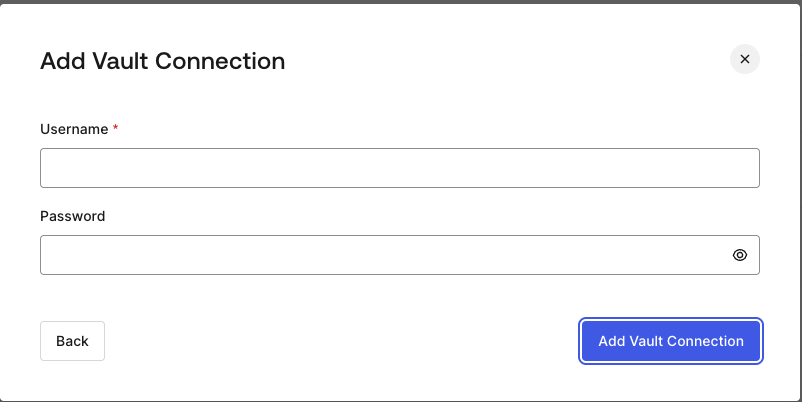
To configure a HTTP Vault Connection using **Basic Auth** authorization, you need to set the required parameters.
<Frame>
  <img src="https://mintcdn.com/docs-dev-automated-sdk-version-update/j5tlqzpJuvD-o885/docs/images/customize/forms/vaults/http-vault-connection-basic-authentication.png?fit=max&auto=format&n=j5tlqzpJuvD-o885&q=85&s=417c54d31f1e6c3aef93aeaada6ea542" alt="Dashboard > Actions > Forms > Vault > HTTP " data-og-width="802" width="802" data-og-height="402" height="402" data-path="docs/images/customize/forms/vaults/http-vault-connection-basic-authentication.png" data-optimize="true" data-opv="3" srcset="https://mintcdn.com/docs-dev-automated-sdk-version-update/j5tlqzpJuvD-o885/docs/images/customize/forms/vaults/http-vault-connection-basic-authentication.png?w=280&fit=max&auto=format&n=j5tlqzpJuvD-o885&q=85&s=acdddbe94f906c5fa0b4e227f0748078 280w, https://mintcdn.com/docs-dev-automated-sdk-version-update/j5tlqzpJuvD-o885/docs/images/customize/forms/vaults/http-vault-connection-basic-authentication.png?w=560&fit=max&auto=format&n=j5tlqzpJuvD-o885&q=85&s=fcff7ef8a5cc2e7f7a0d320fb65de570 560w, https://mintcdn.com/docs-dev-automated-sdk-version-update/j5tlqzpJuvD-o885/docs/images/customize/forms/vaults/http-vault-connection-basic-authentication.png?w=840&fit=max&auto=format&n=j5tlqzpJuvD-o885&q=85&s=3016cf3132a894ef1b6192b20d548155 840w, https://mintcdn.com/docs-dev-automated-sdk-version-update/j5tlqzpJuvD-o885/docs/images/customize/forms/vaults/http-vault-connection-basic-authentication.png?w=1100&fit=max&auto=format&n=j5tlqzpJuvD-o885&q=85&s=6a9e1ae45a772dd7f49e92cecb3e3b20 1100w, https://mintcdn.com/docs-dev-automated-sdk-version-update/j5tlqzpJuvD-o885/docs/images/customize/forms/vaults/http-vault-connection-basic-authentication.png?w=1650&fit=max&auto=format&n=j5tlqzpJuvD-o885&q=85&s=eeb212d7007fd04a1c4f212cb9c1b1b3 1650w, https://mintcdn.com/docs-dev-automated-sdk-version-update/j5tlqzpJuvD-o885/docs/images/customize/forms/vaults/http-vault-connection-basic-authentication.png?w=2500&fit=max&auto=format&n=j5tlqzpJuvD-o885&q=85&s=b7ea1d286f3dce3395365ef11409d4cb 2500w" />
</Frame>

### Input settings

| Parameter | Description                                                                                         |
| --------- | --------------------------------------------------------------------------------------------------- |
| Username  | Username to be concatenated and base64 encoded, then added as Basic Authorization Header parameter. |
| Password  | Password to be concatenated and base64 encoded, then added as Basic Authorization Header parameter. |

<Warning>
  HTTP Vault Connection with Basic Auth configuration, is looking forward to replace the currently built-in option at Flows HTTP Request Action.
</Warning>
